
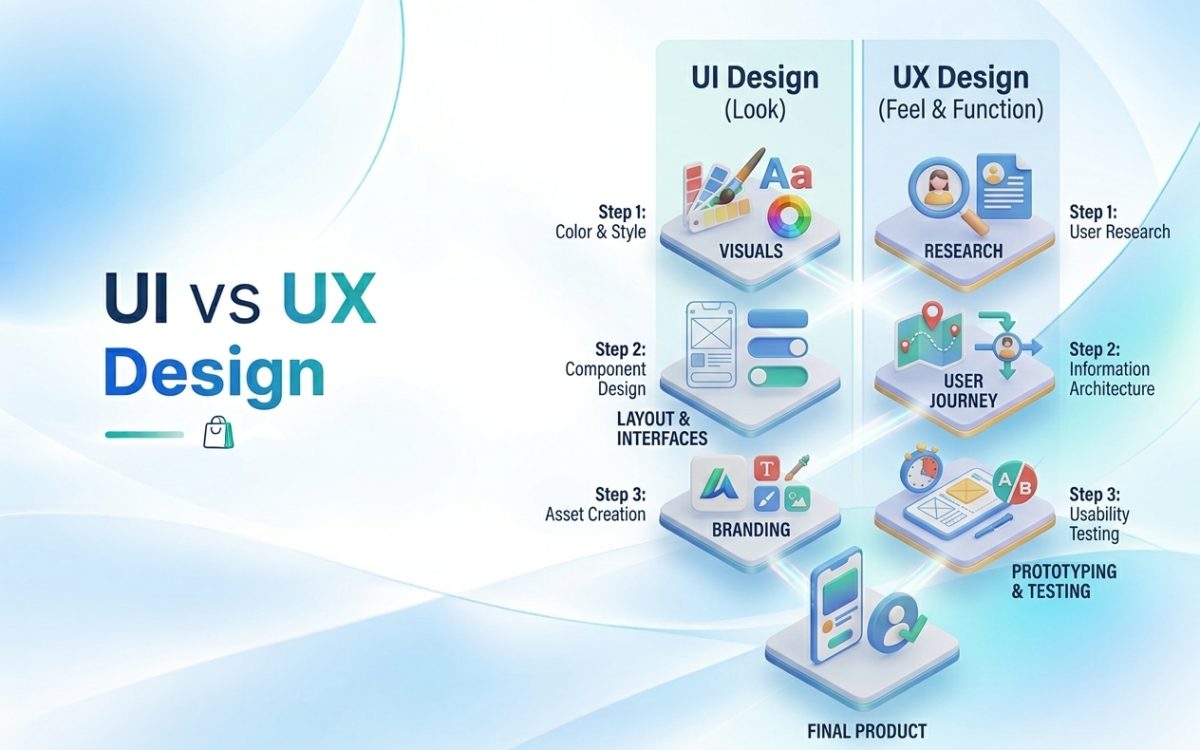
UX design (user experience) is about how a product works and how it feels to use from start to finish: whether people can find what they need, understand it and complete their task without friction. UI design (user interface) is about what people actually see and touch on the screen: layout, colour, typography, buttons, icons and visual feedback. UX decides that a checkout should take three steps instead of six; UI decides what those three steps look like.
You need both. A site with beautiful UI and poor UX looks impressive and loses customers. A site with solid UX and weak UI works, but feels untrustworthy or forgettable. This guide explains each discipline, how they fit together, what the design process looks like, and how to tell which one your website is struggling with.
What is UX design?
UX design focuses on the whole experience a person has with your product or website. The term “user experience” was popularised by cognitive scientist Don Norman, who used it in the 1990s to describe everything a person goes through when interacting with a product, not just the screen.
A UX designer typically works on:
- User research: interviews, surveys, analytics and observation to understand what users need and where they struggle.
- Information architecture: organising content and navigation so people can find things where they expect them.
- User flows: mapping the steps someone takes to complete a task, such as booking a meeting or buying a product.
- Wireframes and prototypes: simple layouts and clickable mock-ups to test structure before visual design.
- Usability testing: watching real people use the design and fixing what confuses them.
The central UX question is: can the right person achieve their goal easily, and does the experience make them want to come back?
What is UI design?
UI design focuses on the visual and interactive surface of the product. A UI designer typically works on:
- Visual hierarchy: making the most important element on each screen the most noticeable.
- Typography and colour: readable type, a consistent palette, enough contrast to be accessible.
- Components: buttons, forms, cards, menus and modals that look and behave consistently.
- States and feedback: what happens on hover, tap, error, loading and success.
- Design systems: reusable libraries of components and rules so every new page stays consistent.
The central UI question is: does each screen look clear, consistent and trustworthy, and does it respond the way people expect?
UI vs UX: the key differences
- UX covers the full journey and how well it works. UI covers the visual and interactive layer of each screen.
- Questions asked. UX asks “what should this do and in what order?” UI asks “how should this look and respond?”
- UX produces research findings, user flows, sitemaps, wireframes and prototypes. UI produces high-fidelity screens, component libraries and style guides.
- Tools and methods. UX relies on research, analytics, card sorting and usability testing. UI relies on visual design tools, typography, colour theory and motion.
- How success is measured. UX success shows in task completion, conversion rates, fewer support requests and lower drop-off. UI success shows in clarity, consistency, accessibility and perceived quality.
A simple analogy: if your website were a house, UX would be the floor plan, where the rooms are and how you move between them, and UI would be the materials, colours, furniture and lighting. A beautiful house with a kitchen you can only reach through the bathroom is still a bad house.
How UI and UX work together: a practical example
Take an e-commerce checkout for an Egyptian shopper.
The UX work discovers, through analytics and testing, that many shoppers leave at the payment step because they want to pay cash on delivery and cannot see the option, and that the address form asks for details people do not know, such as postal codes. The UX solution: show payment options clearly upfront, simplify the address form around districts and landmarks, and let returning customers check out in one step.
The UI work then makes that solution clear on a small screen: large tap targets, the delivery fee shown before the final step, trust signals near the pay button, clear error messages in Arabic and English, and a progress indicator so people know how close they are to finishing.
Neither fix works without the other. We cover the full picture of selling online in this market in building an e-commerce website in Egypt.
The UI/UX design process, step by step
- Understand the business goal, the users and their pain points through data and conversation.
- Turn findings into clear problems to solve and decide what success looks like.
- Build the sitemap, user flows and information architecture.
- Lay out each key screen in low fidelity and test the flow.
- Prototype and test. Create clickable prototypes and watch real users try them.
- Visual design. Apply the brand, design the components and finish high-fidelity screens.
- Give developers clear specifications, assets and component documentation.
- Measure and iterate. After launch, use analytics and feedback to keep improving.
These steps sit inside the wider website development process, which covers everything from the brief to launch.
Does your website have a UX problem or a UI problem?
Signs of a UX problem:
- Visitors land on key pages but leave without taking action.
- People use search or contact support to find things that should be easy to find.
- Forms have high abandonment, especially on mobile.
- Your sales team keeps answering the same basic questions the website should answer.
Signs of a UI problem:
- The site looks dated or inconsistent compared with competitors.
- Text is hard to read, buttons are hard to spot, or colours clash with your brand.
- Pages look different from one section to the next.
- Visitors say the site feels untrustworthy even though it works.
Most websites have some of both. Fix UX issues first, since a prettier version of a broken journey is still broken.
UI/UX design for Arabic and bilingual interfaces
Designing for Arabic users is more than translating text:
- Mirror the layout properly. Navigation, progress indicators, sliders and directional icons should flip for right-to-left reading. Logos, media playback controls and some charts usually should not.
- Choose Arabic fonts for screens. Some Arabic typefaces look elegant in print but become hard to read at small sizes. Test on real phones.
- Allow for text length. Arabic and English copy rarely take the same space. Layouts should flex rather than truncate.
- Write microcopy natively. Button labels, error messages and form hints should sound natural in Arabic, not like a literal translation.
- Respect local conventions. Phone number formats, address structures, payment preferences and calendars can all differ by market.
Accessibility is part of both disciplines
Accessible design helps everyone, including people with visual, motor or cognitive impairments, and anyone using a phone outdoors in bright sun. The Web Content Accessibility Guidelines (WCAG) recommend, for example, a contrast ratio of at least 4.5:1 for normal body text. Clear labels, keyboard navigation, alt text and readable font sizes are basic UI and UX hygiene, not optional extras.
Do you need a UI designer, a UX designer, or both?
For smaller websites, a single experienced UI/UX designer can cover both, especially with a clear brief and a solid brand system. If your visual identity needs work first, see what goes inside a brand kit.
For larger platforms, apps or e-commerce sites, the work usually splits: a UX lead focuses on research, flows and testing, and a UI designer focuses on the visual system and components. Apps add their own considerations, covered in our guide to native vs cross-platform mobile app development.
If you want to see what strong UI and UX look like in practice, browse our list of 20 website designs worth studying.
Is your website looking good but not converting? Content Khana’s UI/UX and web design team starts with research and user journeys, then designs bilingual interfaces that are clear, fast and on-brand. Book a free consultation and we will review your key pages with you.
Frequently asked questions about UI and UX design
What is the main difference between UI and UX?
UX is about how the whole experience works and feels, from finding information to completing a task. UI is about the look and behaviour of each screen: layout, colours, typography and interactive elements.
Which comes first, UI or UX?
UX usually comes first, because research, structure and user flows decide what each screen needs to do. UI then designs how those screens look and respond. In practice the two overlap and influence each other.
Is UI/UX design the same as web design?
Web design is a broader term that includes UI and UX for websites, as well as visual branding on the site. UI/UX design also applies to mobile apps, software and other digital products.
How do I know if my website needs a UX redesign?
Look for high bounce rates on key pages, abandoned forms, low conversion despite good traffic, and repeated customer questions the site should answer. These usually point to UX problems rather than visual ones.
Does good UI/UX design help SEO?
Indirectly, yes. Clear structure, fast pages, mobile-friendly layouts and content that answers questions well all support both user satisfaction and search performance.
Conclusion
UI and UX are two halves of the same job. UX makes sure your website does the right things in the right order for the right people. UI makes sure it looks clear, consistent and trustworthy while doing them. Invest in both, start with the journey, test with real users, and design for Arabic and English from the first wireframe.
Ready to fix the experience, not just the look? Book a meeting with Content Khana or message us on WhatsApp.